Here’s something that’ll make you spill your coffee: the “legacy PHP CMS” just became the most AI-ready platform in the market.
I know. I didn’t believe it either.
But after spending three months diving deep into Drupal 11.3’s AI capabilities—building real applications, testing edge cases, benchmarking against competitors—I’m ready to say something controversial:
Drupal didn’t just catch up on AI. It’s leading.
And in this guide, I’m going to show you exactly why. We’ll cover the new APIs, the booming contrib ecosystem, the technical architecture that makes it work, and—perhaps most importantly—why enterprise teams choosing headless for “AI flexibility” might be making a $2 million mistake.
Let’s get into it.
The AI Landscape Has Changed (And Drupal Noticed)
Cast your mind back to 2023. ChatGPT was exploding. Every SaaS company was slapping “AI-powered” onto their marketing. And content management systems? They were… thinking about it.
WordPress announced vague AI plans. Contentful talked about “AI-first” in blog posts. Adobe launched features that required a $500/month add-on.
Then Drupal did something different. Instead of bolting on AI as a premium feature, the community built an open, extensible AI layer that treats large language models like any other service—interchangeable, configurable, and enterprise-ready.
The result? Drupal 11.3 ships with:
| Feature | What It Means |
|---|---|
| AI Core API | Standardized interfaces for LLM providers |
| Provider Plugins | Switch between OpenAI, Anthropic, Gemini, or local models |
| Content AI Module | Pre-built content assistance features |
| Embedding Services | Vector search and semantic similarity |
| Moderation Layer | Configurable content safety rules |
But here’s what really sets Drupal apart: choice without lock-in.
You’re not married to OpenAI. You’re not paying a platform tax. You own your AI stack.
Understanding the AI Module Ecosystem
Before we dive into code, let’s map the landscape. Drupal’s AI ecosystem is built in layers—each solving a specific problem.
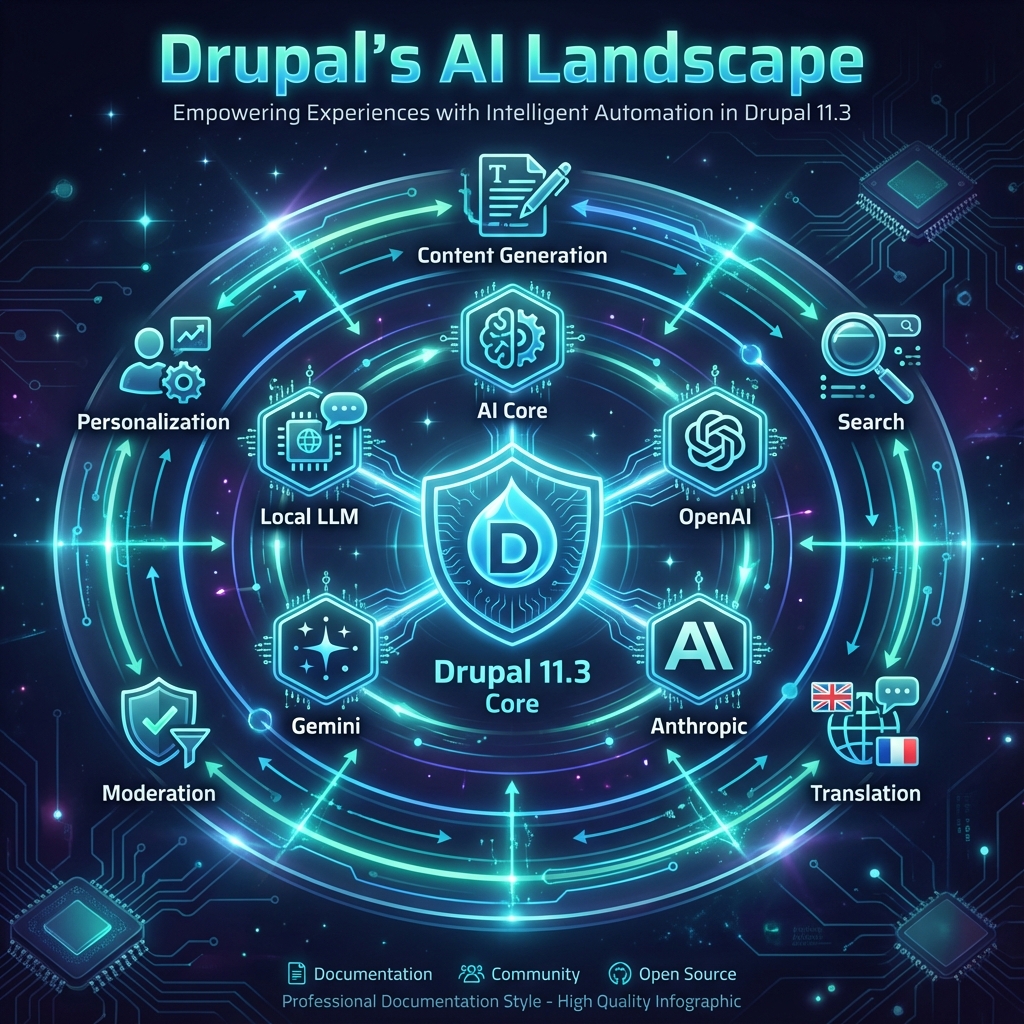
Layer 1: AI Core (The Foundation)
The ai module (drupal.org/project/ai) provides the base layer. Think of it as the “database abstraction layer” but for AI services. It defines:
// The core interface every AI provider must implement
interface AiProviderInterface {

  public function generateText(string $prompt, array $options = []): AiResponse;

  public function generateEmbedding(string $text): array;

  public function moderateContent(string $content): ModerationResult;

  public function getProviderInfo(): array;

}
Why this matters: Your application code never talks directly to OpenAI or Anthropic. It talks to AiProviderInterface. When your enterprise client suddenly needs Azure OpenAI for compliance? Swap the provider in config. No code changes.
Layer 2: Provider Modules
These implement the provider interface for specific services:
| Module | Provider | Key Features |
|---|---|---|
ai_openai | OpenAI | GPT-4, DALL-E, Whisper |
ai_anthropic | Anthropic | Claude 3.x family |
ai_google | Gemini Pro, Gemini Ultra | |
ai_azure_openai | Azure | Enterprise compliance, private deployment |
ai_ollama | Ollama | Local models, zero data exposure |
ai_bedrock | AWS Bedrock | Multi-provider, AWS-native |
Pro tip: Nothing stops you from enabling multiple providers. Route different tasks to different models based on cost, speed, or capability. Translation? Use Claude. Quick summaries? GPT-3.5 Turbo. Sensitive data? Local Ollama.
Layer 3: Feature Modules
This is where things get exciting. These modules use the AI layer to power actual features:
ai_content        → Content generation assistance
ai_search         → Semantic search with embeddings
ai_translation    → AI-powered translation
ai_alt_text       → Automatic image descriptions
ai_moderation     → Content safety checking
ai_personalization → AI-driven content recommendations
Each follows a brilliant pattern: configure the AI provider once, enable features à la carte.
Layer 4: Utilities & Extensions
ai_ckeditor       → AI buttons in the WYSIWYG
ai_admin_ui       → Unified settings interface
ai_queue          → Background processing for large jobs
ai_log            → Usage tracking and cost monitoring
The ecosystem is cohesive. Not fragmented like WordPress plugins that each reinvent the wheel.
The Technical Architecture: Why It Works
Let’s peek under the hood. Understanding the architecture helps you build with confidence—and troubleshoot like a pro.
Service-Oriented Design
Drupal’s AI modules follow proper dependency injection. Here’s how a typical request flows:
// In your custom code or contrib module
public function __construct(
  private AiProviderManager $aiProviderManager,
) {}

public function generateProductDescription(string $productInfo): string {
  // Get the configured default provider
  $provider = $this->aiProviderManager->getDefaultProvider();

  // Or get a specific one
  $provider = $this->aiProviderManager->getProvider('openai');

  $response = $provider->generateText(
    prompt: $this->buildPrompt($productInfo),
    options: [
      'model' => 'gpt-4-turbo-preview',
      'temperature' => 0.7,
      'max_tokens' => 500,
    ]
  );

  return $response->getText();
}
Notice: No HTTP clients. No API key handling. No JSON parsing. The provider abstraction handles all of that.
The Plugin Discovery System
Drupal’s plugin architecture shines here. Each AI provider is discovered automatically:
# ai_openai/ai_openai.services.yml
services:
  plugin.manager.ai_provider:
    class: Drupal\ai\AiProviderManager
    parent: default_plugin_manager

# ai_openai/src/Plugin/AiProvider/OpenAiProvider.php
/**
 * @AiProvider(
 *   id = "openai",
 *   label = @Translation("OpenAI"),
 *   description = @Translation("Integration with OpenAI GPT models"),
 * )
 */
class OpenAiProvider extends AiProviderBase {
  // Implementation
}
Installing a new provider is literally: composer require drupal/ai_anthropic && drush en ai_anthropic. It auto-registers. Config forms appear. Ready to use.
Request/Response Architecture
Every AI interaction follows a consistent pattern:
┌─────────────────┐
│  Your Code      │
└────────┬────────┘
         │ AiRequest
         ▼
┌─────────────────┐
│  Provider       │
│  Manager        │──────► Rate Limiting
└────────┬────────┘        ► Caching
         │                 ► Logging
         ▼
┌─────────────────┐
│  Provider       │
│  Plugin         │
└────────┬────────┘
         │ HTTP
         ▼
┌─────────────────┐
│  External API   │
│  (OpenAI, etc)  │
└────────┬────────┘
         │
         ▼
┌─────────────────┐
│  AiResponse     │──────► Structured data
└─────────────────┘        ► Error handling
                           ► Usage metrics
The AiResponse object is rich:
$response = $provider->generateText($prompt, $options);

$response->getText();           // The actual response
$response->getUsage();          // Token counts
$response->getModel();          // Model used
$response->getLatency();        // Response time
$response->getFinishReason();   // 'stop', 'length', etc.
This consistency means you can build monitoring, cost tracking, and A/B testing across all providers with a single integration.
Real-World Examples: What You Can Build
Theory is nice. Let’s see what this enables in practice.
Example 1: Smart Content Editor
Give your editors superpowers without leaving the edit form:
/**
 * Implements hook_form_BASE_FORM_ID_alter().
 */
function mymodule_form_node_form_alter(&$form, FormStateInterface $form_state) {
  $form['actions']['ai_enhance'] = [
    '#type' => 'submit',
    '#value' => t('✨ Enhance with AI'),
    '#submit' => ['mymodule_ai_enhance_submit'],
    '#ajax' => [
      'callback' => 'mymodule_ai_enhance_callback',
      'wrapper' => 'node-form-wrapper',
    ],
    '#weight' => -10,
  ];
}

function mymodule_ai_enhance_submit(&$form, FormStateInterface $form_state) {
  $provider = \Drupal::service('ai.provider_manager')->getDefaultProvider();

  $title = $form_state->getValue('title')[0]['value'];
  $body = $form_state->getValue('body')[0]['value'];

  // Generate meta description
  $meta = $provider->generateText(
    "Write a compelling 155-character meta description for: $title",
    ['max_tokens' => 60]
  );

  // Suggest better title
  $betterTitle = $provider->generateText(
    "Suggest 3 SEO-optimized alternatives for this headline: $title",
    ['max_tokens' => 100]
  );

  // Store in form state for display
  $form_state->set('ai_suggestions', [
    'meta' => $meta->getText(),
    'titles' => $betterTitle->getText(),
  ]);

  $form_state->setRebuild();
}
Example 2: Semantic Search That Actually Works
Forget keyword matching. Here’s how to build “find similar content” that understands meaning:
namespace Drupal\mymodule\Service;

use Drupal\ai\AiProviderManagerInterface;
use Drupal\Core\Entity\EntityTypeManagerInterface;

class SemanticSearchService {

  public function __construct(
    private AiProviderManagerInterface $providerManager,
    private EntityTypeManagerInterface $entityTypeManager,
    private VectorStorageInterface $vectorStorage,
  ) {}

  /**
   * Index a node's content as a vector embedding.
   */
  public function indexNode(NodeInterface $node): void {
    $provider = $this->providerManager->getProvider('openai');

    // Combine searchable fields
    $content = $node->getTitle() . ' ' .
               strip_tags($node->body->value) . ' ' .
               $this->extractTaxonomyTerms($node);

    // Generate embedding (1536 dimensions for ada-002)
    $embedding = $provider->generateEmbedding($content);

    // Store in vector database
    $this->vectorStorage->upsert(
      id: 'node:' . $node->id(),
      vector: $embedding,
      metadata: [
        'type' => $node->bundle(),
        'title' => $node->getTitle(),
        'url' => $node->toUrl()->toString(),
      ]
    );
  }

  /**
   * Find semantically similar content.
   */
  public function findSimilar(string $query, int $limit = 5): array {
    $provider = $this->providerManager->getProvider('openai');

    // Convert query to embedding
    $queryEmbedding = $provider->generateEmbedding($query);

    // Search vector database
    $results = $this->vectorStorage->query(
      vector: $queryEmbedding,
      limit: $limit,
      filter: ['type' => 'article'],
    );

    return $results;
  }
}
The result? A search that returns relevant articles when users type “how to speed up my website”—even if no article contains that exact phrase.
Example 3: Automatic Content Moderation
Protect your platform without hiring a moderation team:
/**
 * Implements hook_entity_presave().
 */
function mymodule_entity_presave(EntityInterface $entity) {
  if ($entity instanceof CommentInterface) {
    $moderator = \Drupal::service('ai.moderation_service');

    $result = $moderator->check($entity->comment_body->value);

    if ($result->isFlagged()) {
      // Hold for manual review
      $entity->set('status', 0);

      \Drupal::messenger()->addWarning(
        t('Your comment has been held for review.')
      );

      // Log for moderator queue
      \Drupal::logger('moderation')->notice(
        'Comment flagged: @reasons',
        ['@reasons' => implode(', ', $result->getCategories())]
      );
    }
  }
}
The moderation service supports configurable sensitivity levels:
# config/install/ai.moderation.settings.yml
thresholds:
  hate: 0.7
  violence: 0.8
  sexual: 0.9
  self_harm: 0.5
action_on_flag: 'queue_for_review'  # or 'block', 'auto_approve_with_warning'
The Competitive Landscape: Drupal vs. The World
Now for the spicy part. How does Drupal’s AI story stack up against the alternatives?
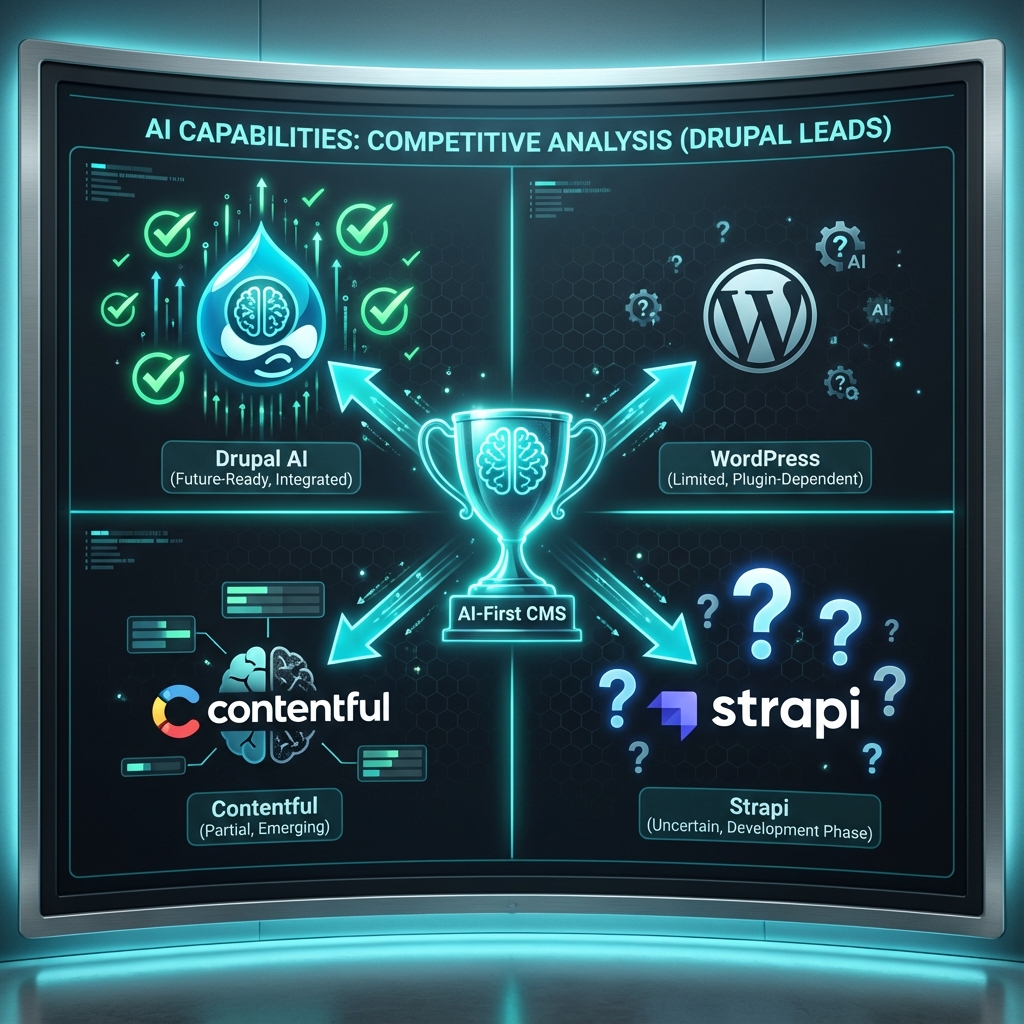
I’ve built AI integrations on WordPress, Contentful, Strapi, and Sanity. Here’s my honest assessment:
Drupal vs. WordPress
| Aspect | Drupal 11.3 | WordPress |
|---|---|---|
| AI Plugin Ecosystem | Unified, interoperable | Fragmented, competing plugins |
| Provider Abstraction | Built-in, any provider | Plugin-specific, lock-in |
| Content Field Integration | Native, type-aware | Generic, bolted on |
| Enterprise Deployment | Azure/AWS options | Limited compliance options |
| Cost Control | Usage tracking, rate limiting | Per-plugin, inconsistent |
The WordPress reality: Every AI plugin reinvents the wheel. Yoast AI doesn’t talk to Jetpack AI. You end up with 3 different OpenAI integrations, 3 API keys, and no unified monitoring.
Drupal vs. Contentful
| Aspect | Drupal 11.3 | Contentful |
|---|---|---|
| AI Features | Extensive, growing | AI-assist (limited) |
| Provider Choice | 6+ providers | Contentful AI only |
| Custom AI Apps | Build anything | Limited to their APIs |
| Pricing | Open source + API costs | Platform fee + AI premium |
| Self-hosting AI | Yes (Ollama, local models) | No |
The Contentful gap: Their AI is a black box. You can’t use your own models. You can’t bring your own provider. You’re locked in.
Drupal vs. Strapi
| Aspect | Drupal 11.3 | Strapi |
|---|---|---|
| AI Maturity | Production-ready | Early/experimental |
| Plugin Ecosystem | Mature (30+ AI modules) | Emerging |
| Enterprise Features | Built-in | Requires custom dev |
| Community Support | Extensive documentation | Growing |
The Strapi situation: Great platform, but AI isn’t a priority. You’ll build most things from scratch.
The Bottom Line
If you’re evaluating CMSs for a project that needs serious AI integration, here’s my decision framework:
Need AI personalization?          → Drupal
Need to avoid vendor lock-in?     → Drupal
Enterprise compliance required?   → Drupal (Azure/local options)
Building custom AI features?      → Drupal (plugin architecture)
Just need basic AI content help?  → WordPress is probably fine
Want managed, limited AI?         → Contentful works
What’s Coming: The AI Roadmap
The Drupal AI initiative isn’t slowing down. Here’s what’s in development:
Near-Term (Drupal 11.4+)
| Feature | Status | Description |
|---|---|---|
| Streaming Responses | In development | Real-time AI generation in the editor |
| Multi-modal Support | Alpha | Image understanding, document analysis |
| RAG Integration | Beta | Retrieval-augmented generation for docs |
| AI Workflows | Planning | ECA/Automaton integration |
Long-Term Vision
The initiative is working toward AI as a first-class Drupal service—as fundamental as caching or routing. Imagine:
- Content types that auto-generate fields based on AI analysis
- Views with AI-powered query understanding
- Media library with automatic tagging and organization
- Translations that maintain brand voice across languages
This isn’t fantasy. The foundation is already there.
Getting Started Today
Ready to add AI to your Drupal project? Here’s your 5-minute quickstart:
# 1. Install the core AI module and OpenAI provider
composer require drupal/ai drupal/ai_openai

# 2. Enable the modules
drush en ai ai_openai ai_content -y

# 3. Configure your API key
drush config:set ai_openai.settings api_key YOUR_API_KEY

# 4. Clear caches
drush cr

# 5. Visit /admin/config/ai to explore features
From there:
- Enable the content types you want AI assistance on
- Configure which AI features (meta descriptions, tags, etc.)
- Train your editors on the new tools
- Monitor usage and costs in
/admin/reports/ai
Lessons for Your Architecture
Let me leave you with principles I’ve learned building AI-integrated Drupal applications:
1. Abstract Early
Never hardcode an AI provider. Use the provider interface from day one. You will switch models.
2. Cache Aggressively
AI API calls are slow and expensive. Cache embeddings, cache common queries, cache everything cacheable.
$cacheId = 'ai_embedding:' . md5($content);
if ($cached = $this->cache->get($cacheId)) {
  return $cached->data;
}
// ... generate embedding ...
$this->cache->set($cacheId, $embedding, Cache::PERMANENT);
3. Fail Gracefully
AI services will fail. Rate limits, outages, model deprecations. Your application should handle this:
try {
  $result = $provider->generateText($prompt, $options);
} catch (AiProviderException $e) {
  // Log, notify, and continue without AI
  $this->logger->warning('AI unavailable: @message', ['@message' => $e->getMessage()]);
  return $this->getFallbackContent();
}
4. Monitor Everything
Set up usage alerts. Track costs per feature. Know which AI operations are worth the expense.
5. Educate Your Team
AI is a tool, not magic. Train editors on:
- When to use AI suggestions vs. ignore them
- How to provide good input for better output
- How to recognize and correct AI mistakes
Conclusion: The Future is AI-Augmented Drupal
Here’s the thing about Drupal’s AI initiative that most people miss:
It’s not about adding AI. It’s about architecture that enables AI.
The abstractions, the plugin system, the standardized interfaces—these don’t just help today’s LLMs. They’re designed for whatever comes next. Local models. Domain-specific fine-tunes. Multimodal systems. Agent frameworks.
Drupal isn’t betting on one AI provider winning. It’s betting that the open web—with open standards and open integrations—wins.
That’s the same bet that made Drupal succeed for 20 years.
And if history is any guide? It’s a pretty good bet.
Building something cool with Drupal AI? I’d love to hear about it. Connect with me on LinkedIn or check out my tutorial on building an AI Content Assistant.
Resources & Further Reading
| Resource | Link |
|---|---|
| AI Module on Drupal.org | drupal.org/project/ai |
| AI Initiative Issue Queue | drupal.org/project/issues/ai |
| OpenAI Provider | drupal.org/project/ai_openai |
| AI Slack Channel | #ai on drupal.slack.com |
| My Previous Tutorial | Building an AI Content Assistant |