
How to patch Drupal core and contrib modules
Using the Composer Patches plugin
One of the first things I was taught when I started working with Drupal was "Never hack Core!" and this adage still holds in Drupal 11 as much as it did back in Drupal 7. This tutorial will explain the correct way to apply as-yet unreleased bug fixes and features to Drupal core or a contrib module.
Prior knowledge
For the this article I will assume that you are familiar with:
- Composer and how to run its commands
- The concept of a patch and how to create or obtain one
Introduction
The package that enables patching is called Composer Patches (see cweagans/composer-patches). The best description of this packagecomes from the documentation:
A simple plugin for Composer that allows you to apply patches to your dependencies.
Installation
The Composer Patches package is installed in the same way as a Drupal module, the command is: composer require cweagans/composer-patches:^2.0
Define patches
Details of all required patches are described in the "extra" section of composer.json, e.g.:
{
    [...],
    "extra": {
        "patches": {
            "drupal/core": {
                "This is the description of the patch": "https://www.example.com/path/to/file.patch",
                "This is a patch": "https://www.example.com/different/path/to/file.patch"
            },
            "drupal/metatag": {
                "This is a local patch": "/path/to/local/file.patch"
            }
        }
    }
}
The example above applies two patches to Drupal core and one patch to the contrib module Metatag - the patches are segregated by the package names. The notation allows for any number of patches to be applied to each package. Both of the patches for core are stored remotely and accessed with a web address, but the patch for Metatag module is stored locally. Locally stored patches are specified by a path relative to the root of the project.
It is most likely that the patches you wish to apply come from an entry in the issue queue on drupal.org. I have not included it in the example above, but I recommend a naming convention that makes reference to the issue number. This makes it easier for anyone maintaining the code to locate the relevant issue and check for the latest patch. I prefer:
"[issue_number]: [issue_description]": "[location_of_patch]"for example:
"3467129: Incompatibility with Drupal 11": "https://www.drupal.org/files/issues/2025-02-21/slick-f9a8733207-with-jsmin.patch"Avoid auto-generated patches
In November 2020 contributing to a Drupal project shifted from a patch-based workflow to using merge requests. All issues on drupal.org provide a link to a text file of the changes of the merge request.
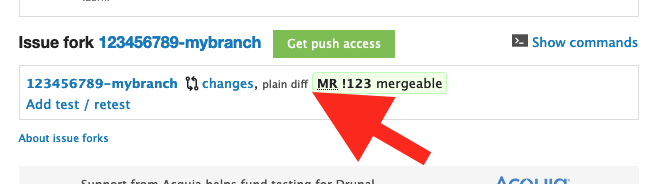
But beware! The content of this patch can change if further commits are pushed. This can pose functionality risks or even a security risk; a malicious user could add a commit that introduces vulnerabilities.
There are a few ways to avoid this. If you download a patch file you can add it to your codebase and specify the local path to it. I have also seen cases where devs have uploaded a patch file to the drupal.org issue, but I'm not sure whether this is to be encouraged. Version 2 of Composer Patches provides the ability to lock the patch file version - this functionality is discussed in full in this follow-up article.
Advanced Usage
This article covers the basic usage of Composer Patches, but only scratches the surface. Look out for my follow-up article discussing more advanced features.